Skip to content
Vast Backup Manager

Backups for every website you run, kept in storage you control

A small agent in each site uploads straight to the SFTP storage you choose, in a folder of its own, on a schedule you set. You see every backup, restore it safely, and get told when something fails.

Start on the Free plan. No payment details are asked when you sign up.

  • Your storage, your credentialsEach website uploads directly to an SFTP account you provide, such as a Hetzner Storage Box sub-account. The manager does not keep your backup files.
  • One site, one folderEach website backs up into its own folder. Give a site its own storage account and trouble on that site cannot open up the backups of your other sites.
  • Built for shared hostingThe agent is plain PHP and checks what the host allows instead of assuming it. It is made for hosts such as Hostinger hPanel and cPanel.
  • Failures are explainedWhen a backup fails, the message says what went wrong and what to do next, in plain words.
Screenshot with sample data
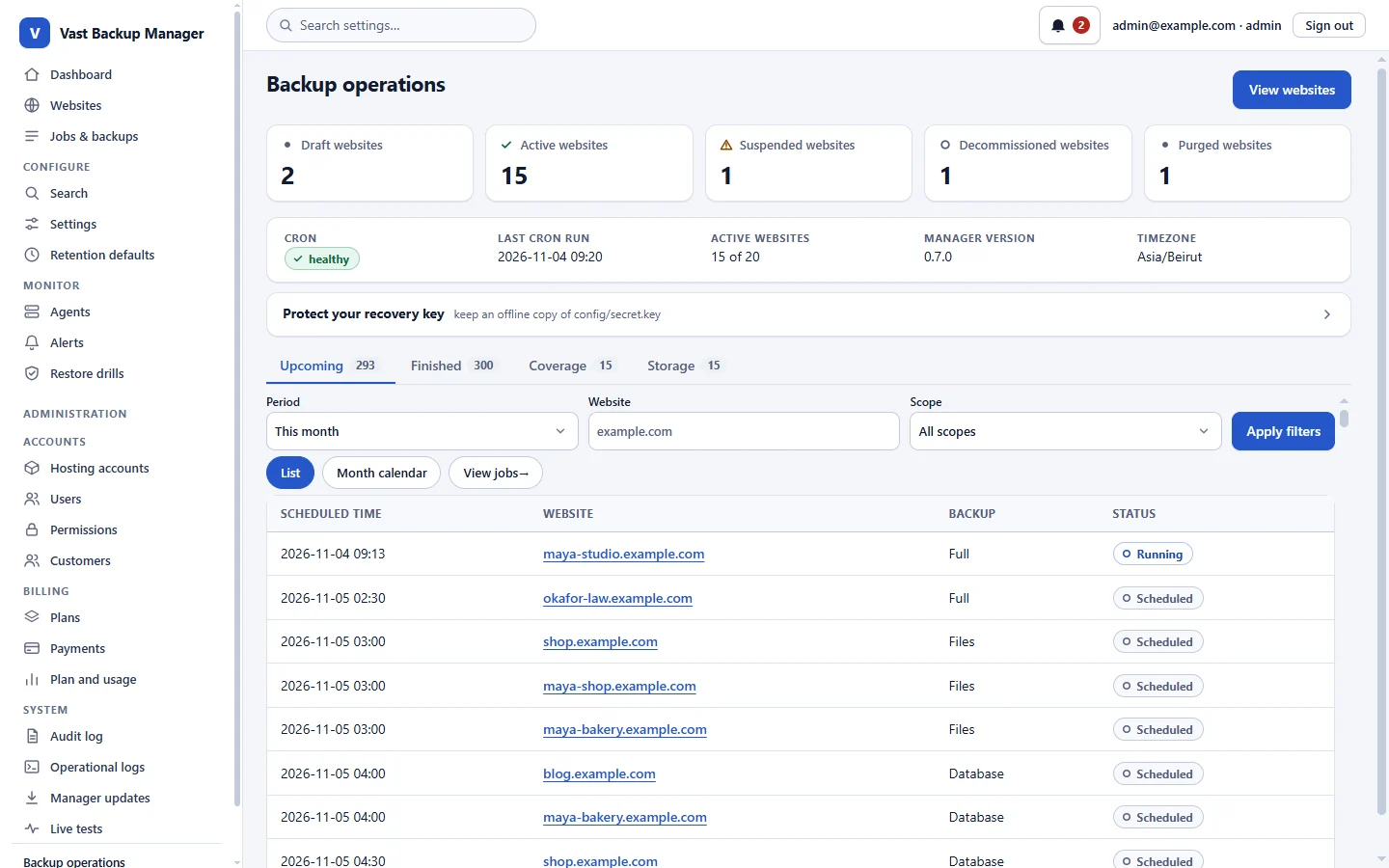
The manager dashboard: counts of websites, the cron status and a list of upcoming scheduled backups.

What it does, one thing at a time

Everything below is in the product you sign up for today.

A backup agent inside every website

Upload one small folder to a site and it backs up that site's files and its database by itself. You do not need shell access on the host.

How it works

The manager prepares a signed agent for the site. Once uploaded, the agent checks what the host allows (tar or zip, mysqldump or a PHP export), connects back to the manager and reports what it found.

Who it helps: Owners and agencies on shared hosting, where installing software is not an option.
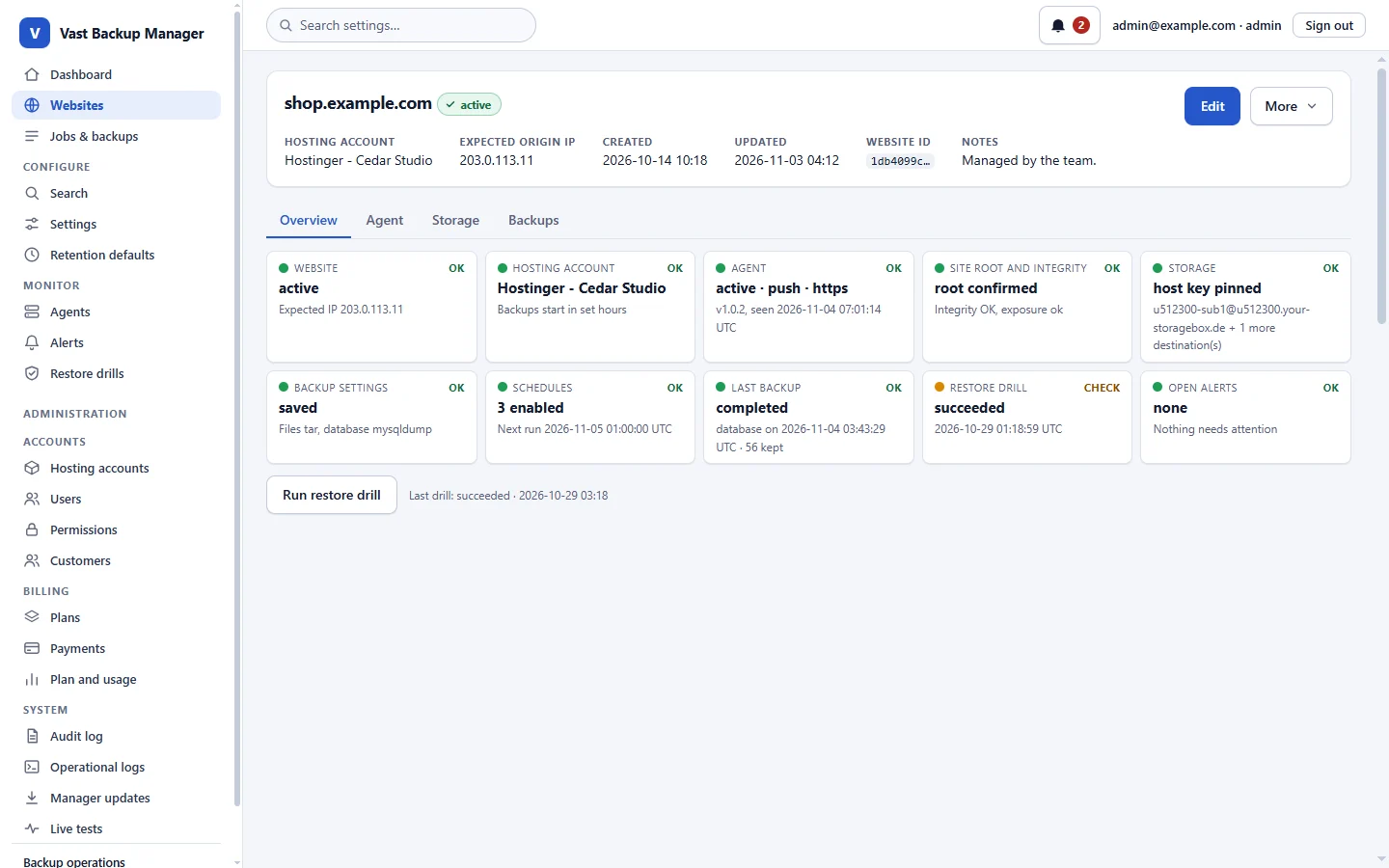
A website page in the manager with status tiles for the agent, storage, schedules, last backup and alerts.

Schedules that respect your host

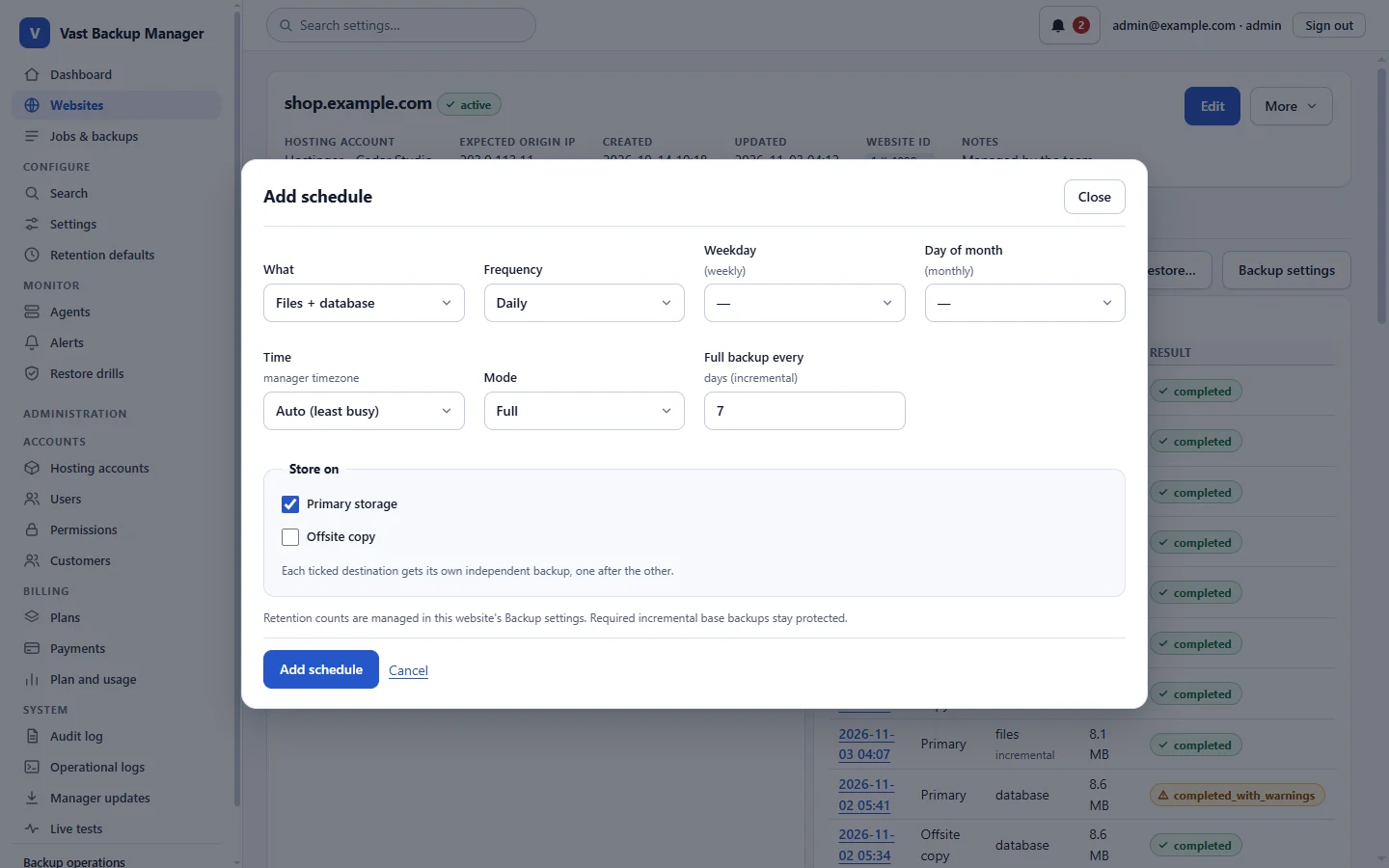
Run daily, weekly or monthly backups, several per site, for the files, the database or both, inside the hours your hosting account allows.

How it works

Pick what to back up, when, and whether it is a full or an incremental backup. The manager starts jobs inside the hosting account's backup window and can pick the least busy time for you.

Who it helps: Anyone whose host limits long-running jobs or heavy night-time load.

The add-schedule dialog with choices for what to back up, how often, which weekday or day, the time and the full or incremental mode.

Backups go to storage you own

Every site uploads straight from the site to its own SFTP storage. You can add more than one destination per website.

How it works

Enter the storage host, user and password once. The password is stored encrypted in the manager. Uploads resume after an interruption, and each part is checked with SHA-256 before the backup is committed.

Who it helps: People who want backups kept away from the hosting account they protect.

Diagram: each website runs its own agent that uploads straight to its own storage account, while the manager sets schedules and receives status.

Every backup in one list

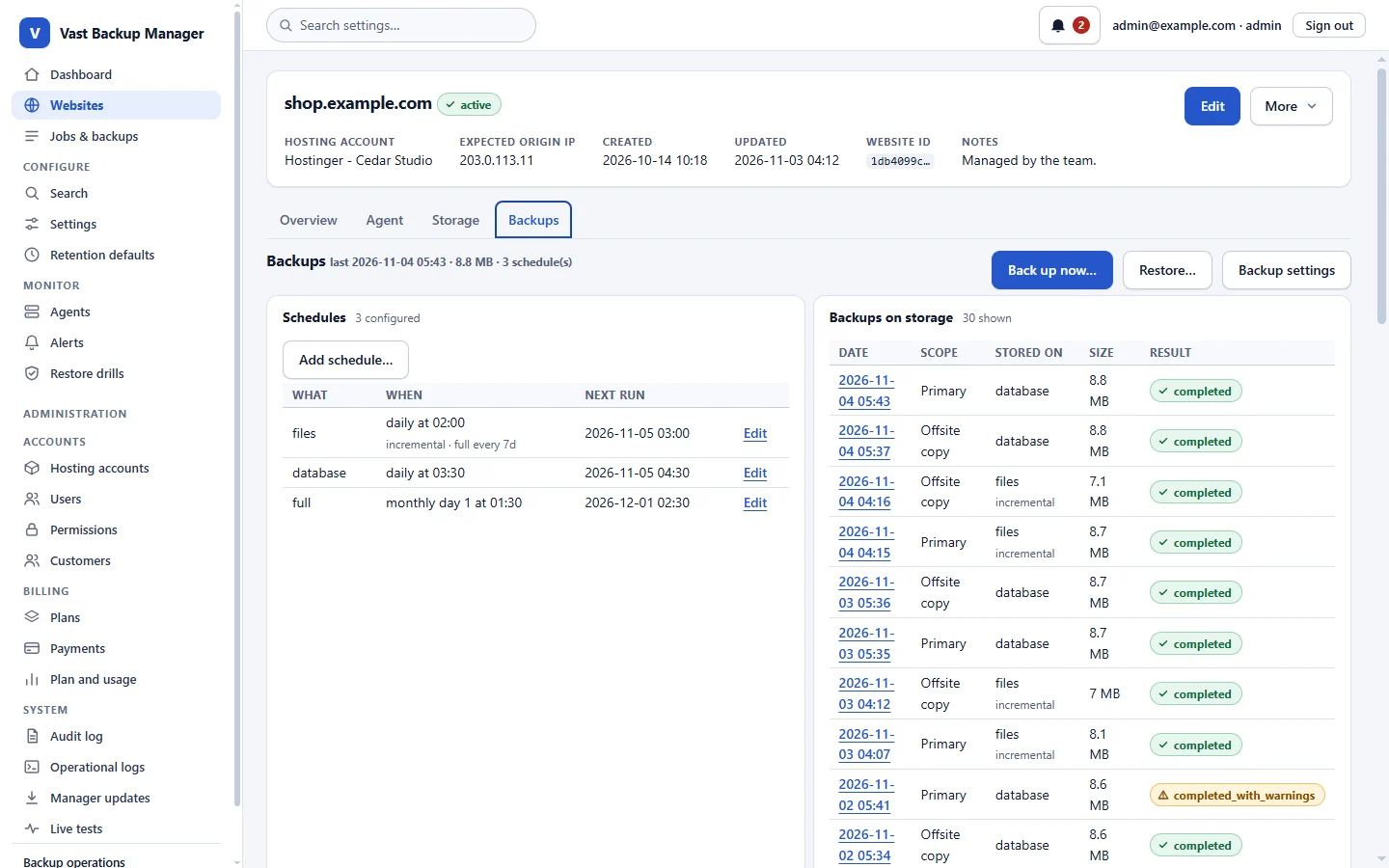
See each backup with its date, scope, size and result, and keep as many as you choose.

How it works

Set how many Files or Full backups and how many Database-only backups to keep, as a default or per site. Backups you start by hand are never removed automatically, and incremental chains stay whole.

Who it helps: Anyone who needs to know what exists before they need it.

The Backups tab of a website listing its schedules and its backups with date, scope, size and result.

Restore without holding your breath

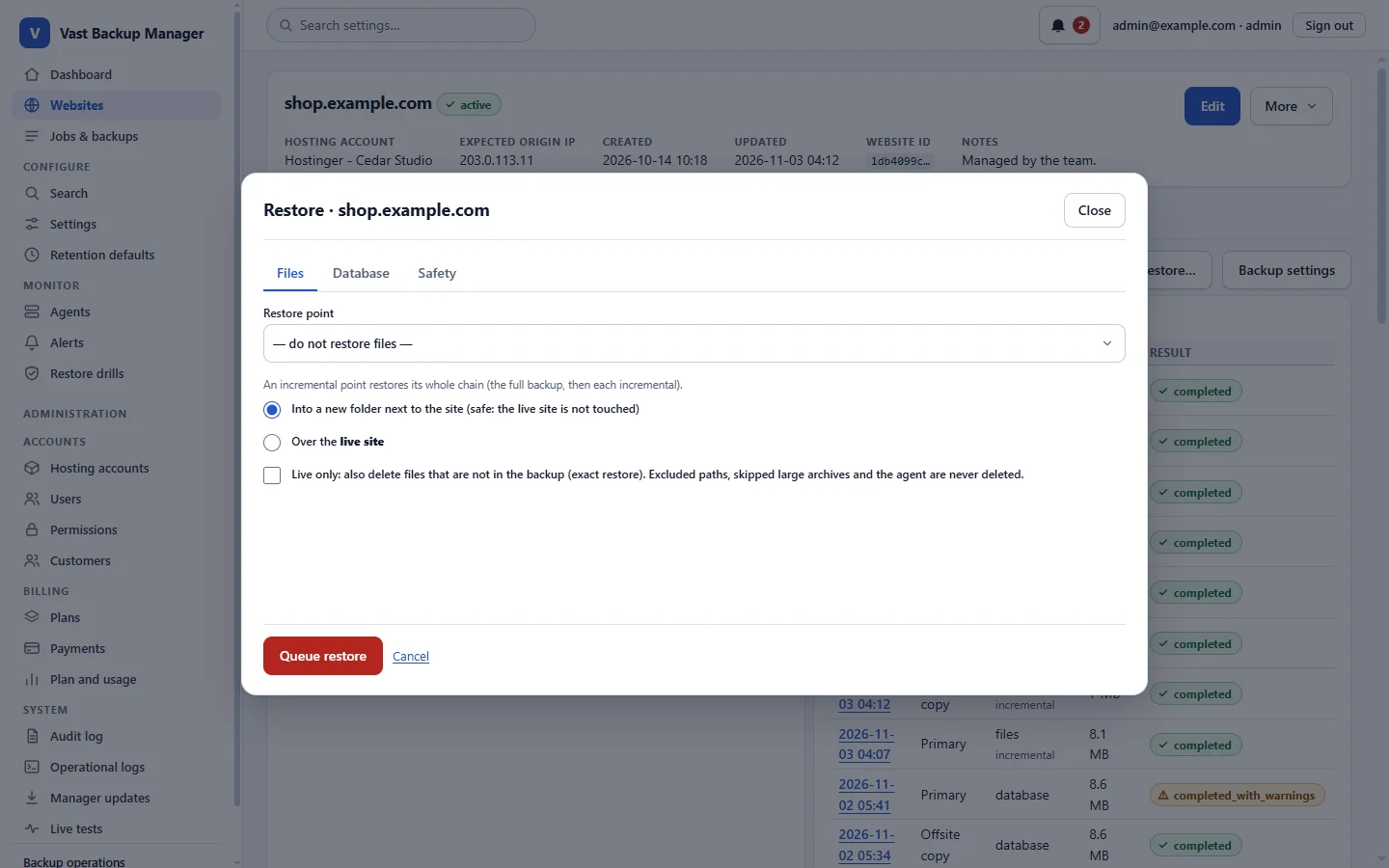
Restore the files, the database or both, into a new folder next to the site or over the live site.

How it works

Choose a restore point. A safety backup is taken first, and a restore over the live site asks you to confirm your password and type the domain.

Who it helps: Anyone who has ever hesitated before pressing restore.

The restore page offering to restore files into a new folder next to the site, or over the live site.

Know before your customers do

Get an alert when a backup fails or runs late, or when an agent stops answering.

How it works

The manager checks on every cron run. Alerts appear in the notification bell and on the Alerts page, and are emailed to you for failed backups of your websites.

Who it helps: People who look after more sites than they can check by hand.

The manager dashboard: counts of websites, the cron status and a list of upcoming scheduled backups.

Also in the box

  • Files and databaseBack up files, the database or both, with tar or zip and mysqldump or a PHP export, chosen from what the host allows.
  • Incremental backupsBack up only what changed since the last full backup to save time and storage.
  • Hosting-account windowsKeep jobs inside the backup hours of each hosting account.
  • Agent health checksThe manager notices a silent agent, changed agent files or an agent folder readable from the web.
  • Email reportsOptional daily or weekly report of what ran and what failed.
  • Agent updatesSigned agent updates you start from the manager, with an automatic roll-back if one fails.

From sign-up to a restore you trust

  1. Create your account

    Choose a plan, sign up and confirm your email address.

  2. Add your website

    Add the site and the hosting account it lives on. The manager prepares its agent.

  3. Install the agent

    Upload the agent folder into the site. It connects back and reports what the host allows.

  4. Set storage and schedule

    Enter the SFTP storage details, then choose when to back up and how many backups to keep.

  5. Watch it run

    Follow jobs, the backup list and alerts. Failures say what happened.

  6. Restore when you need to

    Restore into a side folder to look first, or over the live site once you are sure.

Security, described as it is built

These are the mechanisms in the code today. Nothing here is a certification or a guarantee.

  • Backups are not encrypted by the manager

    Backups travel over SFTP to the storage you provide and are stored there as they are. Protect that storage account; credentials kept in the manager are encrypted.

  • Storage isolation is your choice

    Give each website its own storage account and one compromised site cannot read the backups of the others; sites that share an account share that exposure. A compromised site can still delete its own backups.

  • A fixed list of agent steps

    The agent can back up, upload, verify and restore. It has no feature to run commands sent from outside.

  • Signed requests and releases

    Requests between the manager and each agent are signed, and agent and manager updates are cryptographically signed and can be undone.

  • Integrity and exposure checks

    The manager compares agent files with the signed release and raises an alert if they differ or if the agent folder can be read from the web.

  • Safer sign-in and actions

    Optional two-factor sign-in with an authenticator app, roles and permissions, password confirmation before sensitive actions, and an audit log of who did what.

  • A strict web page policy

    Every page is served with a strict content security policy, form tokens and origin checks, and loads no third-party scripts.

Pricing

Plans are priced by how many hosting accounts, websites and agents you manage. Storage is your own.

Paid plans: you pay by Manual instructions and report the payment. The plan starts when an administrator confirms it; this site never charges you itself.

Limits apply to your whole account and are checked when you add something. Lowering a limit never removes what you already have.

Questions and answers

Where are my backups stored?

In SFTP storage that you provide, for example a Hetzner Storage Box sub-account, one per website or shared. Deleting a website in the manager never deletes the backup files in your storage. The agent uploads straight from your site; the files do not pass through the manager.

Are the backups encrypted?

Not by the manager. They travel over SFTP and are stored as they are, so keep the storage account and its password safe. The storage passwords kept in the manager are encrypted.

Do I pay for storage here?

No. You bring your own storage and pay its provider. Plans are priced by the number of hosting accounts, websites and agents.

Does it work on shared hosting?

It is made for it. The agent is plain PHP and checks what the host allows (tar or zip, mysqldump or PHP) before choosing a method. Hosts differ, so the agent reports what it found when you install it.

What can the agent do on my site?

Only a fixed list of steps: back up, upload, verify and restore. There is no feature to run commands sent from outside.

What if one of my sites is hacked?

A hacked site could delete its own backups, but it has no access to the storage of your other sites.

How do I know a backup can be restored?

Every uploaded part is checked with SHA-256 before a backup is committed. You can also restore into a new folder next to the site and look at the result before touching the live site.

How do I pay for a paid plan?

After you sign up and confirm your email you pick a payment method that is offered: a card payment link, a crypto wallet address or manual instructions. You pay outside this site and report the payment. The plan starts only when an administrator confirms it; this site never charges you itself.

What happens when a plan ends?

A paid plan keeps working for a grace period after its period ends, then your account returns to the Free plan. Nothing is deleted; you just cannot add more than the Free plan allows.

Set up your first backup

Create an account and confirm your email. The manager then walks you through the agent, the storage and the schedule.

Get started Log in